How to Block Someone on TikTok
Block an account from its profile to stop direct contact and limit how you see each other on TikTok.
Visit the person’s profile, tap the Share button, choose Block, then confirm.
Before you start
Check the username carefully so you block the intended account. Blocking is different from reporting a post or account.
Follow the steps
Open the person’s profile
Find the account through search, a comment or a conversation. Tap its name or profile picture to open the profile.

Open the person’s profile. · Tap to enlarge Open the Share menu
Tap the Share arrow at the top of the profile. Look for Block in the actions at the bottom.

Open the Share menu. · Tap to enlarge Confirm the block
Tap Block, then tap Block again in the confirmation.
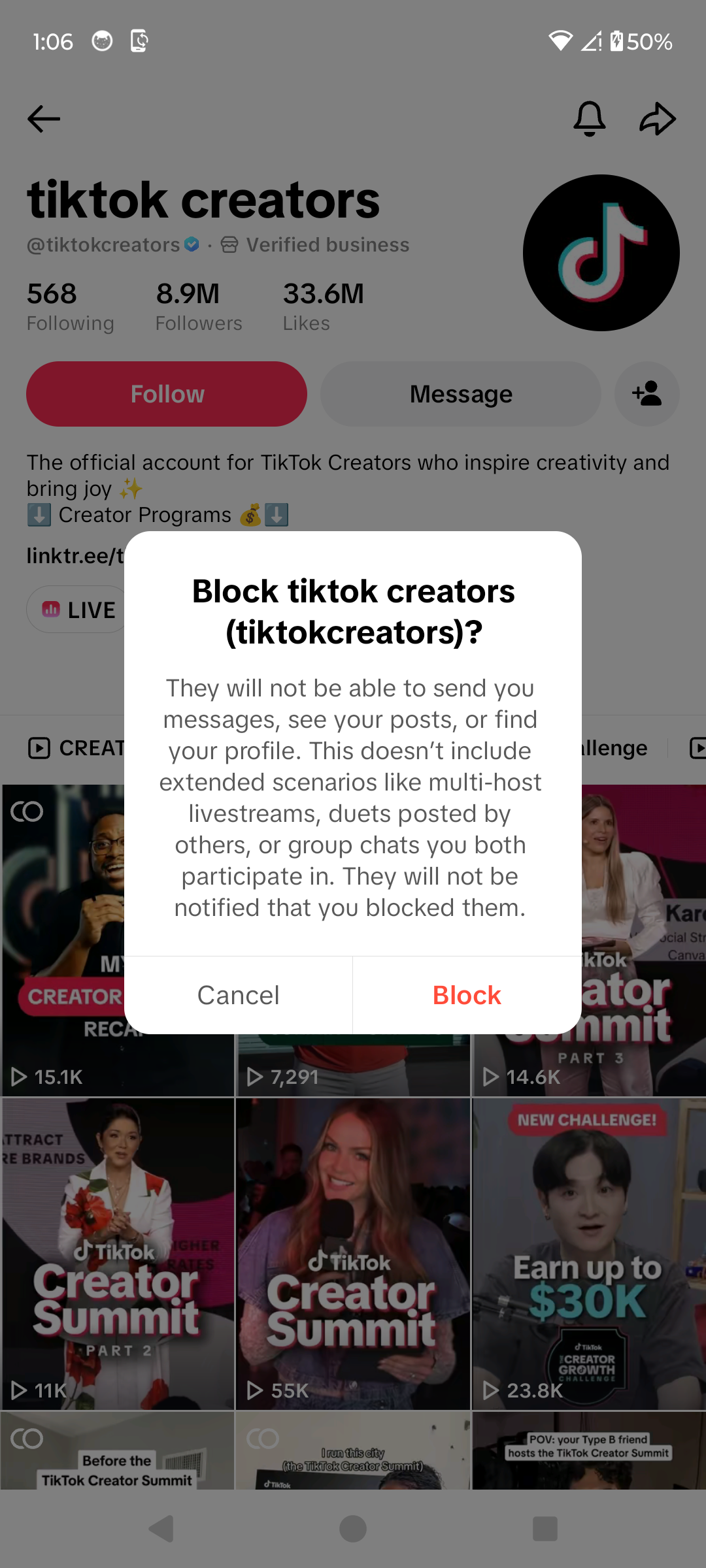
Confirm the block. · Tap to enlarge
A couple of useful details
Will TikTok notify them?
TikTok says it does not send a notification when you block someone.
Will I still see them anywhere?
You may still encounter them in shared group chats, multi-host LIVE streams or Duets posted by others.
How do I undo it?
Open the profile’s Share menu and choose Unblock. You can also find blocked accounts through Profile → menu → Settings and privacy → Privacy → Blocked accounts.
Something not quite right?
Help us keep this guide accurate. A quick flag is enough.
Your report is sent to the Social How-To editorial team.