How to Make Your TikTok Account Private
Approve who can follow you and watch your TikTok content by switching your account to private.
Open Profile, tap the menu, choose Settings and privacy, then open Private account and turn it on.
Before you start
Your username, nickname and profile photo can still be visible. Existing followers are not removed when you make the account private.
Follow the steps
Open Settings and privacy
Tap Profile, tap the three-line menu, then choose Settings and privacy.
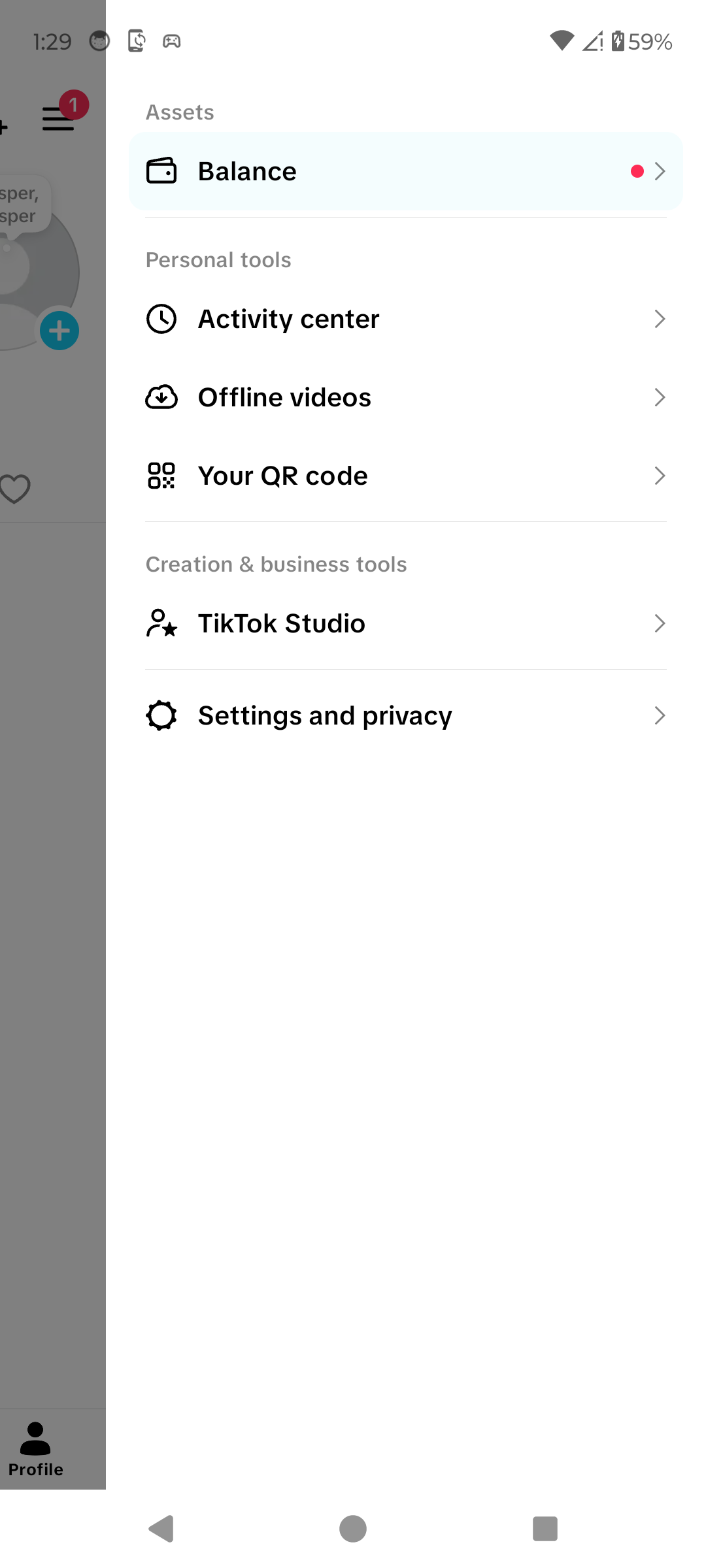
Open Settings and privacy. · Tap to enlarge Open Private account
Under Visibility, tap Private account.

Open Private account. · Tap to enlarge Turn on Private account
Turn on the Private account switch. Check that it remains enabled.

Your TikTok account is now private. · Tap to enlarge
A couple of useful details
What changes with a private account?
Only people you approve can follow you and watch your videos. Some reuse and download features are also restricted.
Will I lose existing followers?
No. TikTok says existing followers are not affected. Review them separately if needed.
Can I switch back to public?
Yes. Return to Private account, turn it off and confirm the change to public.
Something not quite right?
Help us keep this guide accurate. A quick flag is enough.
Your report is sent to the Social How-To editorial team.