How to Download and Install TikTok in the US
Find the official TikTok app, check the developer name, and install it safely on an Android phone in the United States.
Open Google Play, search for TikTok, select the app published by TikTok Pte. Ltd., then tap Install. When installation finishes, tap Open and sign up or log in.
Before you start
Use your phone’s official app store and check the developer before installing. Store availability and download options can vary by account, device, location, and current US requirements.
Follow the steps
Search Google Play
Open Google Play, tap Search, and enter TikTok. Choose the result named TikTok.

Search for TikTok in Google Play. · Tap to enlarge Check the developer
Open the listing and confirm that it identifies TikTok Pte. Ltd. Tap Install. If the button says Open, the app is already installed.
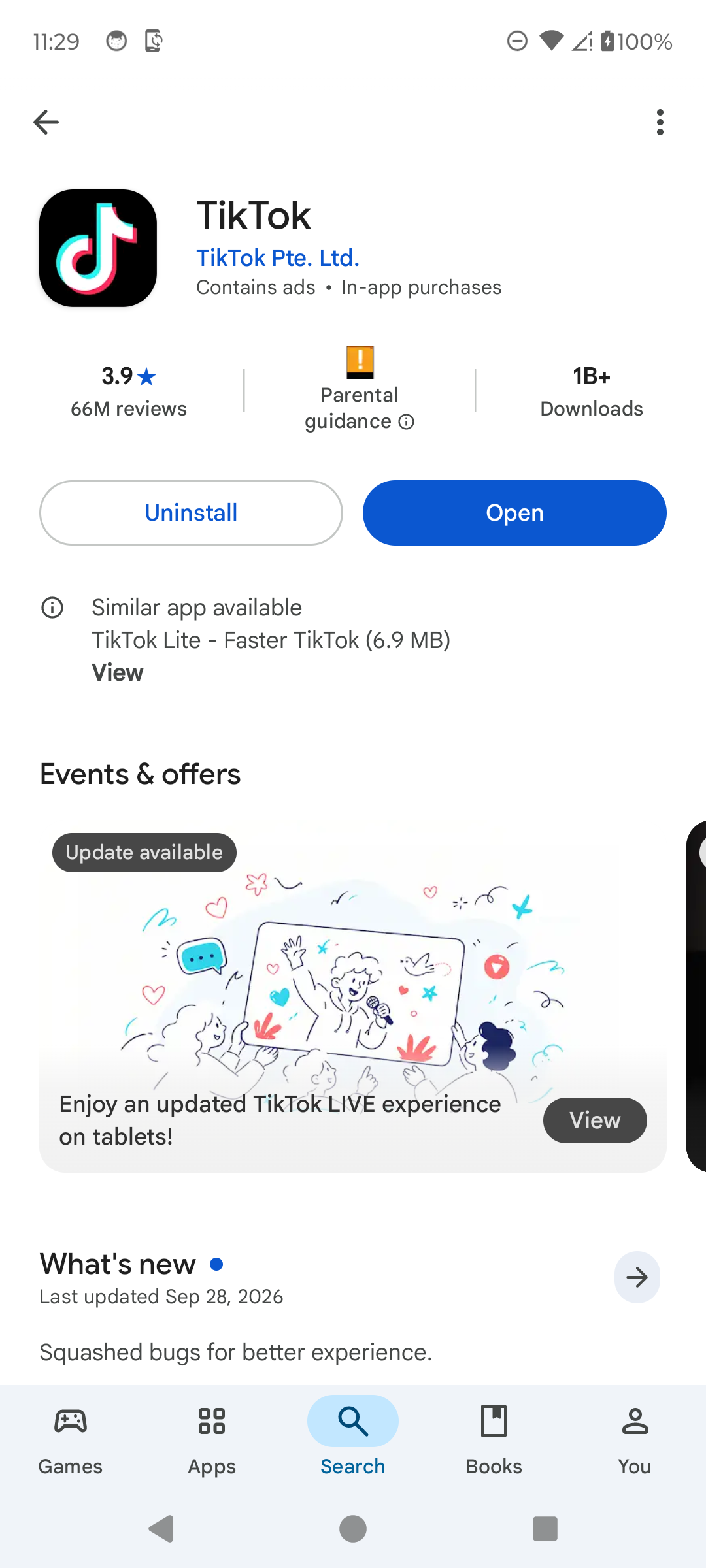
Confirm the developer before installing. · Tap to enlarge Open TikTok
When installation finishes, tap Open. Sign up, log in, or continue from the screen where you previously left the app.

TikTok is installed and ready to use. · Tap to enlarge
A couple of useful details
Which TikTok app is the official one on Android?
The Google Play listing used for this guide is named TikTok and identifies TikTok Pte. Ltd. as the developer.
Why does the button say Open instead of Install?
TikTok is already installed on that device. If an update is offered, install it before opening the app.
Can I download TikTok from another website?
Using the official app store reduces the risk of installing an altered or outdated package.
Something not quite right?
Help us keep this guide accurate. A quick flag is enough.
Your report is sent to the Social How-To editorial team.