How to Download TikTok Videos When Downloads Are Allowed
Save a TikTok video to your phone when the creator allows downloads.
Open the video, tap the Share arrow, then tap Download. If Download is missing, the creator does not allow that video to be saved from TikTok.
Before you start
Download only videos you are allowed to keep and respect the creator's rights when reusing or sharing them. TikTok may add its watermark to downloaded videos.
Follow the steps
Open the video you want to save
Find the TikTok video you want to download, then tap the Share arrow on the right.

Open the video and tap Share. · Tap to enlarge Tap Download
Tap Download in the sharing menu. TikTok saves the video to your device and may then show sharing options.
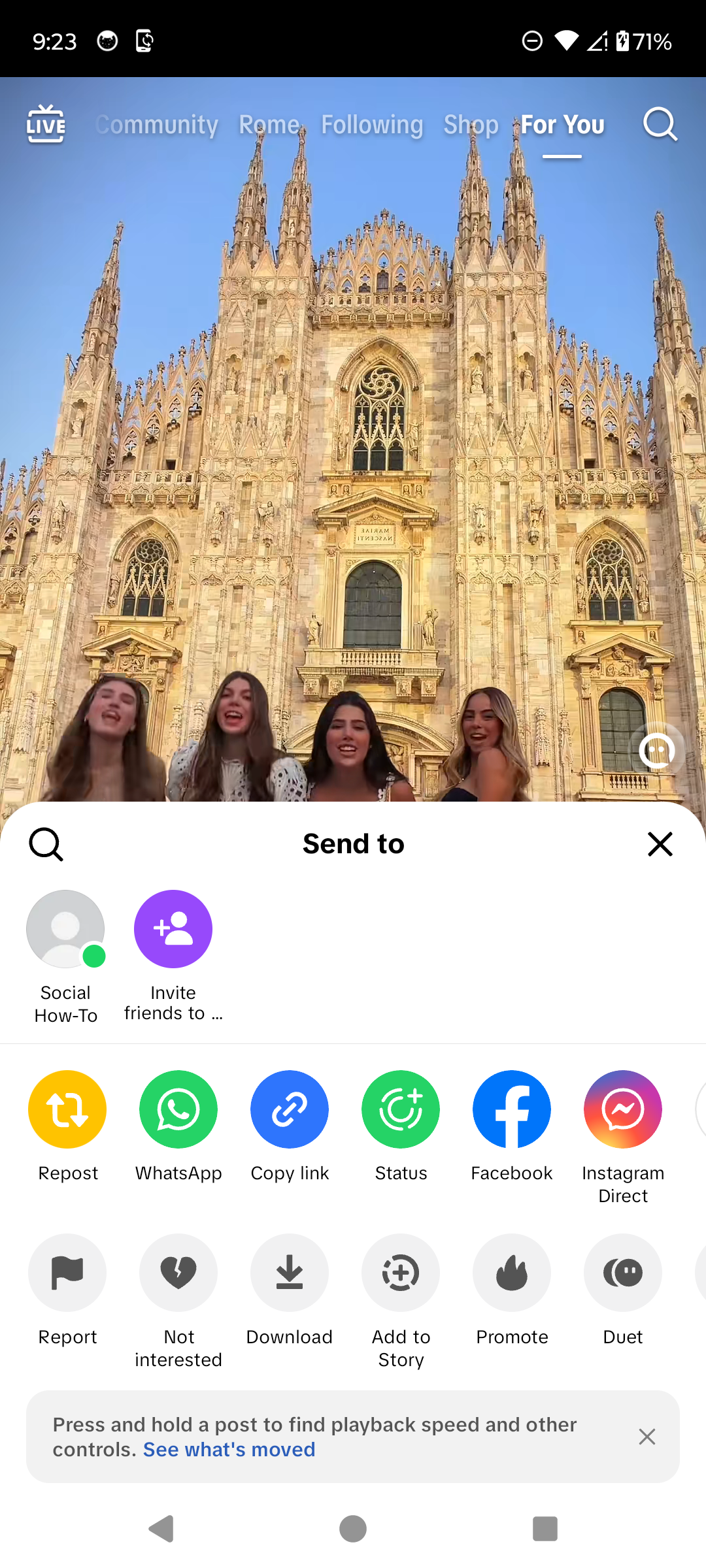
Tap Download to save the video. · Tap to enlarge
A couple of useful details
Why is there no Download button?
The creator may have disabled downloads for that post, or the content may not be eligible for downloading.
Where does TikTok save downloaded videos?
On Android, the video is normally saved to the device's photos or gallery storage.
Can I download every TikTok video?
No. TikTok shows the download option only when downloads are available for that post.
Can I repost a downloaded video as my own?
Downloading does not transfer ownership. Ask permission and credit the creator when appropriate.
Something not quite right?
Help us keep this guide accurate. A quick flag is enough.
Your report is sent to the Social How-To editorial team.